Wednesday, June 3, 2020

Inter-Thread Communication -wait() and notify()

 In java the inter-thread communication will happen by using three methods, namely, wait(), notify() and notifyAll().

All these methods belong to object class as final so that all classes have them. They must be used within a synchronized block only.

  • wait()-It tells the calling thread to give up the lock and go to sleep until some other thread enters the same monitor and calls notify().
  • notify()-It wakes up one single thread that called wait() on the same object. It should be noted that calling notify() does not actually give up a lock on a resource.
  • notifyAll()-It wakes up all the threads that called wait() on the same object.
  • Use of synchronized block to ensures that only one thread runs at a time. 
Java sample Program to explain Inter-thread communication
package com.smartjavaguru;
//Java program to demonstrate inter-thread communication 
//(wait(), join() and notify()) in Java
 
public class ThreadInterCommunication {
public static void main(String[] args) {
BikeFactory bike=new BikeFactory();
new Producer(bike);
new Consumer(bike);
}
}
class BikeFactory
{
private int bike;
// this boolean is used to control thread communication wait method
Boolean check=false;
// synchronized block ensures only one thread running at a time. 
public  synchronized void manufature(int bike) {
if(check) {
try {
// releases the lock on shared resource 
wait();
// and waits till some other method invokes notify(). 
} catch (InterruptedException e) {
// TODO Auto-generated catch block
e.printStackTrace();
}
}
System.out.println(" Number of bikes 
                       Manufactured and ready for sale::"+bike);
this.bike=bike;
// notifies the produce thread that it can wake up. 
notify();
check=true;
}
// synchronized block ensures only one thread running at a time. 
public synchronized void sale() {
if(!check) {
try {
// releases the lock on shared resource 
wait();
             
  // and waits till some other method invokes notify(). 
} catch (InterruptedException e) {
// TODO Auto-generated catch block
e.printStackTrace();
}
}
System.out.println(" Number of bikes are sold out ::"+bike);
// notifies the produce thread that it can wake up. 
notify(); 
check=false;
}
}
class Producer implements Runnable
{
BikeFactory bikefactory;

public Producer(BikeFactory bikefactory) {
this.bikefactory = bikefactory;
// Create a thread object that calls producer() 
Thread t=new Thread(this,"Producer");
t.start();
}
 
public void run() {
int i=0;
while(true) {
bikefactory.manufature(++i);
try {
new Thread().sleep(1000);
} catch (InterruptedException e) {
e.printStackTrace();
}
}
}

}
class Consumer implements Runnable
{
BikeFactory bikeFactory;

public Consumer(BikeFactory bikeFactory) {
this.bikeFactory = bikeFactory;
// Create another thread object that calls consumer()
Thread t=new Thread(this,"Consumer");
t.start();
}

public void run() {
while(true) {
bikeFactory.sale();
try {
// this makes the produce thread to run first. 
new Thread().sleep(2000);
} catch (InterruptedException e) {
e.printStackTrace();
}
}
}

}

OutPut:

 Number of bikes  Manufactured and ready for sale::1
 Number of bikes are sold out ::1
 Number of bikes  Manufactured and ready for sale::2
 Number of bikes are sold out ::2
 Number of bikes  Manufactured and ready for sale::3
 Number of bikes are sold out ::3
 Number of bikes  Manufactured and ready for sale::4
 Number of bikes are sold out ::4
 Number of bikes  Manufactured and ready for sale::5
 Number of bikes are sold out ::5

JAVA FAQs

1)What are the various access modifiers in Java ?

Ans) In Java, access modifiers are the keywords used before a class name ,method name constructor name,variable name and Interface name which defines the access scope of the respective entity. The types of access modifiers that are available in java:

a. Public : In java The public access modifier is specified using the keyword public. Public modifier can be used for Classes,Methods,Fields (Variables),Interfaces and constructors which are accessible from anywhere.

  • The public access modifier has the widest scope among all other access modifiers.
  • Classes, methods or data members which are declared as public are accessible from every where in the program. There is no restriction on the scope of a public data members.

b. Protected: In java the protected access modifier is specified using the keyword protected.The methods or data members declared as protected are accessible within same package or sub classes in different package.

Method,Field can be accessed from the same class to which they belong or from the sub-classes,and from the class of same package,but not from outside.

c. Default: In java no key required .When no access modifier is specified for a class , method or data member – It is said to be having the default access modifier by default. Method,Field,class can be accessed only from the same package and not from outside of it's native package.

d. Private:  In java the private access modifier is specified using the keyword private.The methods or data members declared as private are accessible only within the same class in which they are declared.The members declared as private will not be able to access in any other class of same package or other package .

  • In java top level Classes or interface can not be declared as private because private means “only visible within the enclosing class”.


                                    Default   Private    Protected   Public 
 Same Class Yes Yes Yes Yes
 Same Package
 Sub Class
 Yes No Yes Yes
 Same Package 
 Non Sub Class
 Yes No Yes Yes
 Different Package
 Sub Class
 No No Yes Yes
 Different Package
 Non Sub Class
 No No No Yes

Java Installation and Set Up

Java Installation and Setup

           To  install and setup Java environment you need to search specific Java SDK version in Google like 8,9 or 11 then click on the search results that will take you to the Orcale web to download the required java SDK . 

For eg: please see the below steps to download Java SDK 11.

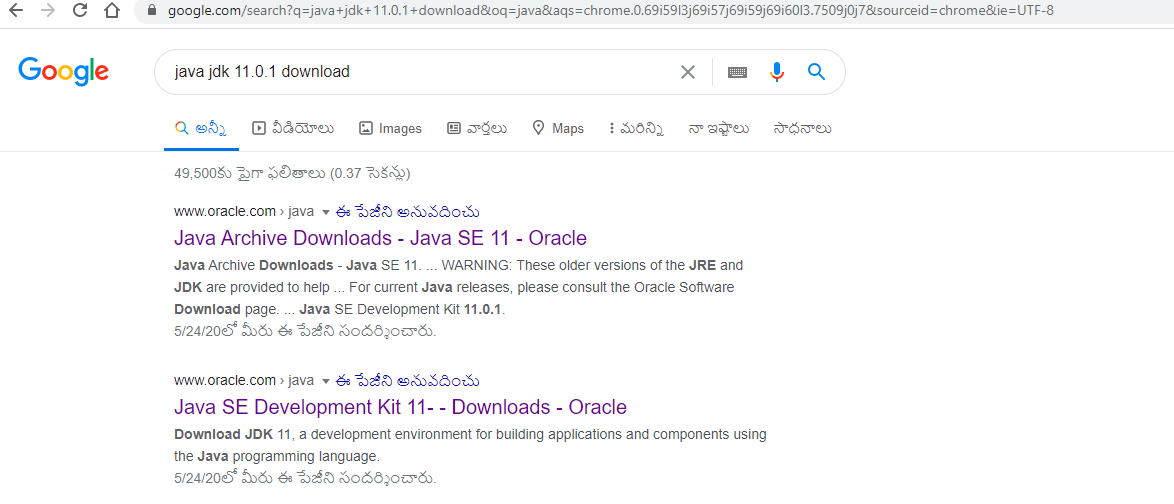
First search for Java 11.0.1 download in the google search you will get the below screen then click on the second search result that will take you to the Oracle site where all the Java specific SDK downloadable s are available.


               The below screen will be shown where all the Java SDK s downloads are available. Then click on down load you will get the below screen and prompt you to check the check box to accept the agreement and proceed to java jdk download.


In case if it prompt you to login to the Oracle site , you can login if you already have a valid login credentials else you can create one new account and go ahead login to the same then you are allowed to download the required software.


Assuming you have installed Java in c:\Program Files\java\jdk directory −
  • Right-click on 'My Computer' and select 'Properties'.
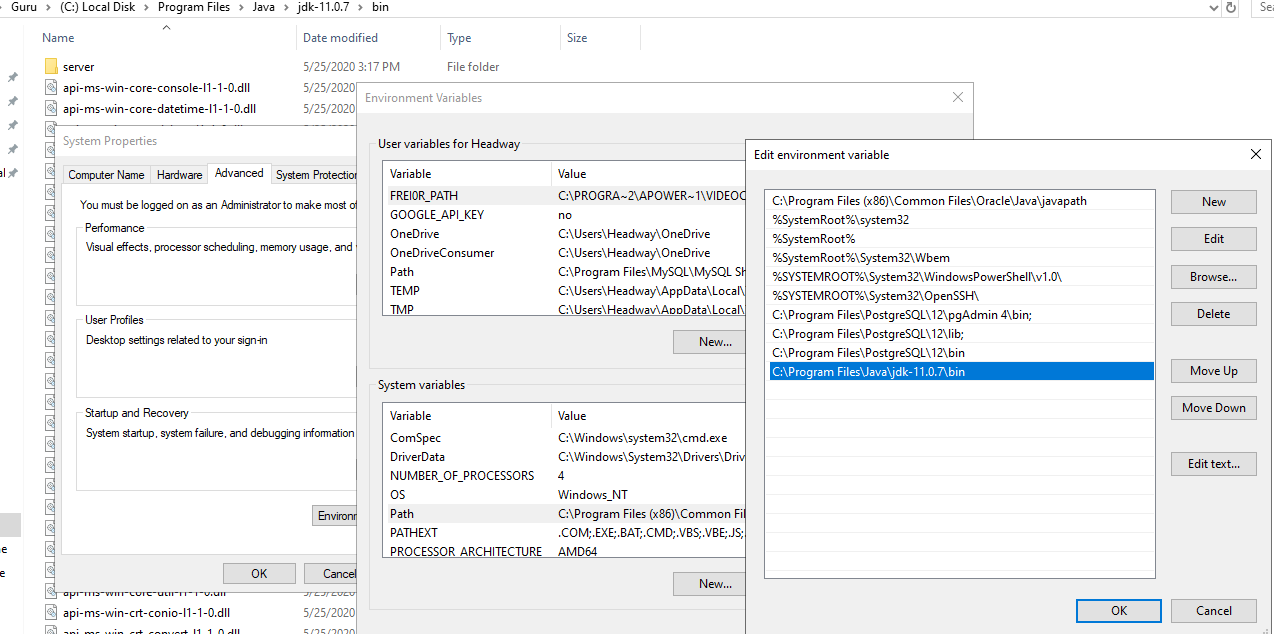
  • Then Click the 'Environment variables' button under the 'Advanced' tab.
  • Now, alter the 'Path' variable so that it also contains the path to the Java executable. 
  • Example, if the path is currently set to 'C:\WINDOWS\SYSTEM32' and other paths, then apend the copied path till 'bin' to the existing path as C:\Program Files\Java\jdk-11.0.7\bin
see below screens for more clarity :

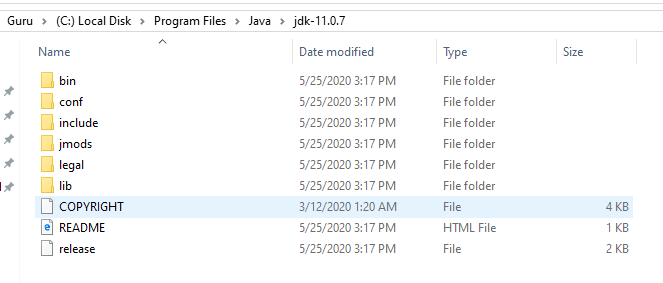
below one is the Java path that you need to copy from your java installed location


Below is screen which will describe you how to navigate to the 'Environment Variable ' path and edit and add the Java path till 'bin' folder on Windows.


Eclipse Set Up 

Below is screen shot which will describe you how to search for Eclipse IDE in google to download the Eclipse .


Once you get the search results click on the first search result and download the eclipse and install the same into your machine.

History Of Java

9FB27BFE98329ACEE57148CADF20E8C0

Java History

                
               James Gosling initiated Java language project in June 1991 for use in one of his many set-top box projects. The language, initially called ‘Oak’ after an oak tree that stood outside Gosling's office, also went by the name ‘Green’ and ended up later being renamed as Java, from a list of random words.
                       Sun released the first public implementation as Java 1.0 in 1995. It promised Write Once, Run Anywhere (WORA), providing no-cost run-times on popular platforms.
On 13 November, 2006, Sun released much of Java as free and open source software under the terms of the GNU General Public License (GPL).
                      On 8 May, 2007, Sun finished the process, making all of Java's core code free and open-source, aside from a small portion of code to which Sun did not hold the copyright.

JAVA

 Java is a high-level secured,Robust,Platform-independent programming language . Java is Initially developed by James Gosling at Sun Microsystems (which is now a subsidiary of Oracle Corporation) and released in 1995.
        According to James Gosling, "Java was one of the top choices along with Silk". Since Java was so unique, most of the team members preferred Java than other names
        We can run Java on a various variety of platforms, such as Mac OS,Windows and the different versions of UNIX.                 

Features Of Java

          The primary objective of Java programming language creation was to make it simple ,portable, robust and secure programming language. Apart from this, there are also some more excellent features which play key role in the wide popularity of java language. The key features of Java are also known as java buzzword

Object-oriented : -  Java is an object-oriented programming language. Everything in Java is an object. Object-oriented means we organize our software as a combination of different types of objects that incorporates both properties (data) and its behavior(methods).


Platform Independent :- Java is platform independent because it is different from other languages like C, C++, etc. which are compiled into platform specific machines while Java is a write once, run anywhere language as it compiled rather than into platform independent byte code. This byte code is distributed over the web and interpreted by the Java Virtual Machine (JVM) on whichever platform it is being run on.

Simple :- Java is designed to be easy to learn and its syntax is simple, clean and easy to understand .If you understand the basic OOP concepts. java would be easy to master.

Secure:-  Java is best known for its security.With Java's secure feature it enables to develop virus-free, tamper-free systems. Authentication techniques are based on public-key encryption.

Architecture-neutral:-  Java is architecture neutral because there are no implementation dependent features, for example, the size of primitive types are fixed.Java compiler generates an architecture-neutral object file format, which makes the compiled code executable on many processors, with the presence of Java runtime system.

Portable :-  Being architecture-neutral and having no implementation dependent aspects of the specification makes Java portable. Compiler in Java is written in ANSI C with a clean portability boundary, which is a POSIX subset.Java is portable because it facilitates you to carry the Java bytecode to any platform. It doesn't require any implementation.


Robust :Java makes an effort to eliminate error prone situations by emphasizing mainly on compile time error checking and runtime checking.

Multi-threaded :- A thread is like a separate program, executing concurrently. We can write Java programs that deal with many tasks at once by defining multiple threads. The main advantage of multi-threading is that it doesn't occupy memory for each thread.With Java's multi-threaded feature it is possible to write programs that can perform many tasks simultaneously. This design feature allows the developers to construct interactive applications that can run smoothly.

Interpreted :- Java byte code is translated on the fly to native machine instructions and is not stored anywhere. The development process is more rapid and analytical since the linking is an incremental and light-weight process.

High Performance :- Java is faster than other traditional interpreted programming languages because Java bytecode is "close" to native code.With the use of Just-In-Time (JIT) compilers, Java enables high performance.

Distributed :- Java is distributed because it facilitates users to create distributed applications in Java. RMI and EJB are used for creating distributed applications. This feature of Java makes us able to access files by calling the methods from any machine on the internet.Java is designed for the distributed environment of the internet.


Dynamic :- Java is a dynamic language. It supports dynamic loading of classes. It means classes are loaded on demand. It also supports functions from its native languages.Java is considered to be more dynamic than C or C++ since it is designed to adapt to an evolving environment. Java programs can carry extensive amount of run-time information that can be used to verify and resolve accesses to objects on run-time.Java supports dynamic compilation and automatic memory management (garbage collection).

Tuesday, June 2, 2020

Access Modifiers in Java

In Java, access modifiers are the keywords used before a class name ,method name constructor name,variable name and Interface name which defines the access scope of the respective entity. The types of access modifiers that are available in java:

a. Public : In java The public access modifier is specified using the keyword public. Public modifier can be used for Classes,Methods,Fields (Variables),Interfaces and constructors which are accessible from anywhere.

  • The public access modifier has the widest scope among all other access modifiers.
  • Classes, methods or data members which are declared as public are accessible from every where in the program. There is no restriction on the scope of a public data members.

b. Protected: In java the protected access modifier is specified using the keyword protected.The methods or data members declared as protected are accessible within same package or sub classes in different package.

Method,Field can be accessed from the same class to which they belong or from the sub-classes,and from the class of same package,but not from outside.

c. Default: In java no key required .When no access modifier is specified for a class , method or data member – It is said to be having the default access modifier by default. Method,Field,class can be accessed only from the same package and not from outside of it's native package.

d. Private:  In java the private access modifier is specified using the keyword private.The methods or data members declared as private are accessible only within the same class in which they are declared.The members declared as private will not be able to access in any other class of same package or other package .

  • In java top level Classes or interface can not be declared as private because private means “only visible within the enclosing class”.


Also see java naming conventions article 

                                    Default   Private    Protected   Public 
 Same Class Yes Yes Yes Yes
 Same Package
 Sub Class
 Yes No Yes Yes
 Same Package 
 Non Sub Class
 Yes No Yes Yes
 Different Package
 Sub Class
 No No Yes Yes
 Different Package
 Non Sub Class
 No No No Yes

Monday, June 1, 2020

Naming Conventions in Java

Naming Conventions: We need to follow java naming conventions while writing java programs . In java we are recommended to follow the naming conventions while defining packages,classes,methods ,variables Interfaces and constants for better maintenance and readability of code.


i)For Packages: In java the prefix of a unique package name is always written in all-lowercase ASCII letters and should be one of the top-level domain names, like com, edu, gov, mil, net, org. Subsequent components of the package name vary according to an organisation’s own internal naming conventions.

Example:
                java.io
                java.lang
                java.util
                com.smartjavaguru

ii)For Classes and Interfaces: While defining classes and Interfaces we need to make sure the first letter starts with a Capital letter of the word or phrase of the name .The name may consists of combination of words in that case first letter of each word starts with a capital letter.

  • Class names should be nouns, in mixed case with the first letter of each internal word capitalized. Interfaces name should also be capitalized just like class names.
  • Use whole words and must avoid acronyms and abbreviations.

Example :  interface Vehicle {}

                    interface Sport{}

                    interface Bike{}

                   class Jeep implements Vehicle{ },

                   class Football implements Sport{}

                  class MoutainBike{}


iii)For Methods : In java all methods should be verbs, all method names starts with a lower case letter (first word first letter) and if the method name consists of more than one word then from the second word onward each word starts with a capital letter (Camel case)

Examples:

                    void sumOfTwoNums(int num1,int num2);

                    void speed(int increment);

                    void calculateInterest(int interestRate);

iv)Variables : In java variable names should be short and meaningful.Variable names should not start with underscore ('_') or dollar sign '$' chars. Single char names should be avoided except for temporary variables .All the variable names should be camelCase letters.

Example: 

                    int num=10;

                    int rate=2;

                    int speed=100;

v)Constants: In java all constants names should be all uppercase with words separated by underscores (“_”). There are various constants used in predefined classes like Float, Long, String etc.

Example: 

               int MIN_LENGTH=10;

              int MAX_SPEED=120;